1-使用已经搭好的服务器
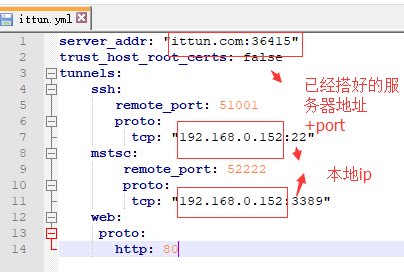
yml
-本地ip可以不用写,只配置第一行就行,默认就是127.0.0.1
-D:\devTool\wechat\ittun_win64>ngrok -config ittun.yml -subdomain txdcool 8091

-进入ngrok文件夹内

-指定启动文件

-指定域名前缀与端口

-http://txdcool.ittun.com/uri
2-自己搭建的服务器
有空弄。

1-使用已经搭好的服务器
yml
-本地ip可以不用写,只配置第一行就行,默认就是127.0.0.1
-D:\devTool\wechat\ittun_win64>ngrok -config ittun.yml -subdomain txdcool 8091
-进入ngrok文件夹内
-指定启动文件
-指定域名前缀与端口
-http://txdcool.ittun.com/uri
2-自己搭建的服务器
有空弄。
原文作者: TangGod
原文链接: https://tanggod.github.io/2018/07/26/本地映射外网-ngork使用/
发表日期: July 26th 2018, 12:00:00 am
版权声明: 本文采用知识共享署名-非商业性使用 4.0 国际许可协议进行许可
jsonContent:
  meta: false
  pages: false
  posts:
    title: true
    date: true
    path: true
    text: false
    raw: false
    content: false
    slug: false
    updated: false
    comments: false
    link: false
    permalink: false
    excerpt: false
    categories: true
    tags: true